
LGWorks is used to create multipoint inspection routines with DSP sensors and guide operators through the routines.
An inspection routine is any number of measurements made on a part or assembly at specified locations in a predetermined order or sequence. The routines guide operators through each measurement point using graphic and/or text instructions. Several characteristics or values may be measured at a single inspection point, such as gap and flush. Calculations using the measured values can be incorporated into the routine and the user can establish the format for the data stored in files on the LaserGauge®. Once a routine is developed and saved in LGWorks, it can be sent to either an LG controller, a DSP sensor, or a PC and used wirelessly with LGWorksRT.
DOWNLOAD PRODUCT DATASHEETS
LaserGauge-ProductDatasheet-LGWorks.pdf
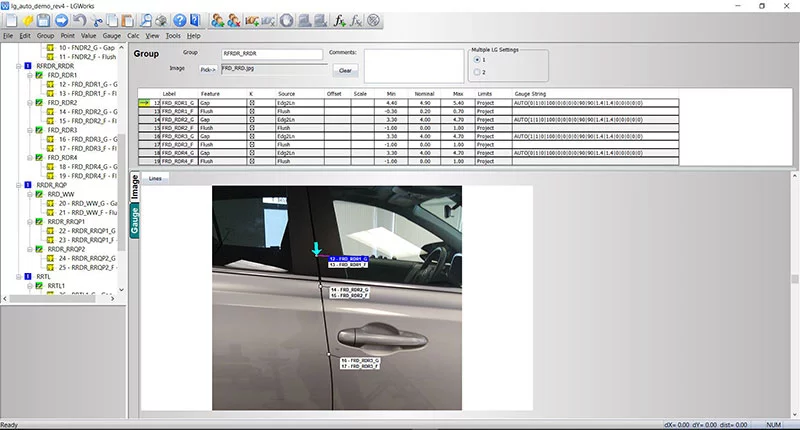
Features of LGWorks
ORGANIZE ROUTINES
Routines are built in a tree-view hierarchy so that points and groups of points can easily be cut, copied and pasted, or moved using drag-and-drop functionality.
More than one measurement may be needed at each inspection point, such as gap and flush. Routine commands tell the LaserGauge® what methodology to use to make the measurements and one pull of the trigger completes all of the measurements at that location.
OPERATOR INSTRUCTIONS
Photos or images of the part being inspected can be copied into LGWorks, and the individual points can be marked by drawing an arrow on the image at the exact location for the measurement. The images are displayed on the graphical controllers or DSP screens with arrows advancing automatically as each measurement is taken.
MEASURED POINTS AND CALCULATIONS
Formulas that use the results from measured points can be added to the routine for calculations such as A/V gaps, parallelism, max gap, range, etc.
SPEC LIMITS
Specification limits can be entered in the routine and used by the LaserGauge® to flag out-of-spec conditions. A second set of limits, called reasonable limits, can also be entered to help filter errant measurements and identify measurements taken at the wrong location.
TEST GAUGES ON SAVED SCANS
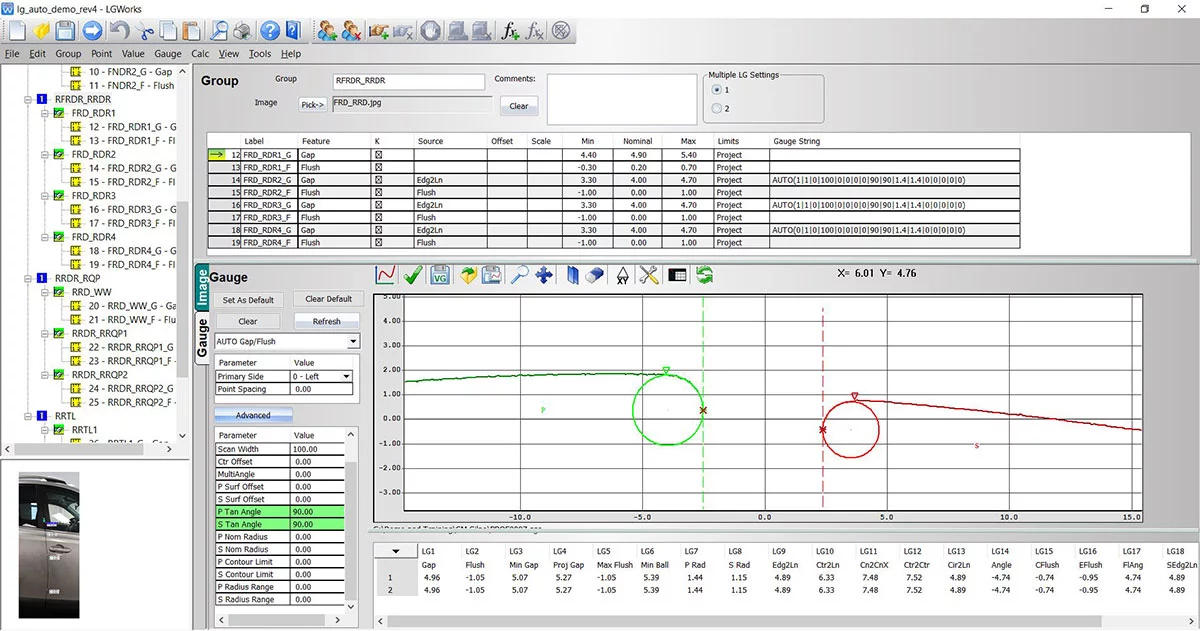
The LaserGauge® can be used to capture raw scans of surface features, such as a weld or a gap. The scan, once retrieved, can be opened in LGWorks and used to test virtual gauge settings. The selected gauge and settings are then incorporated into the routine.
PLOTTED SCANS
Plots showing virtual gauge tests on scans can be saved as graphic images. These images can be used in reports to document the measurement methodology.
ON-SCREEN MEASUREMENTS
Measurements can also be made on-screen in LGWorks using point and click tools.
ROADMAP
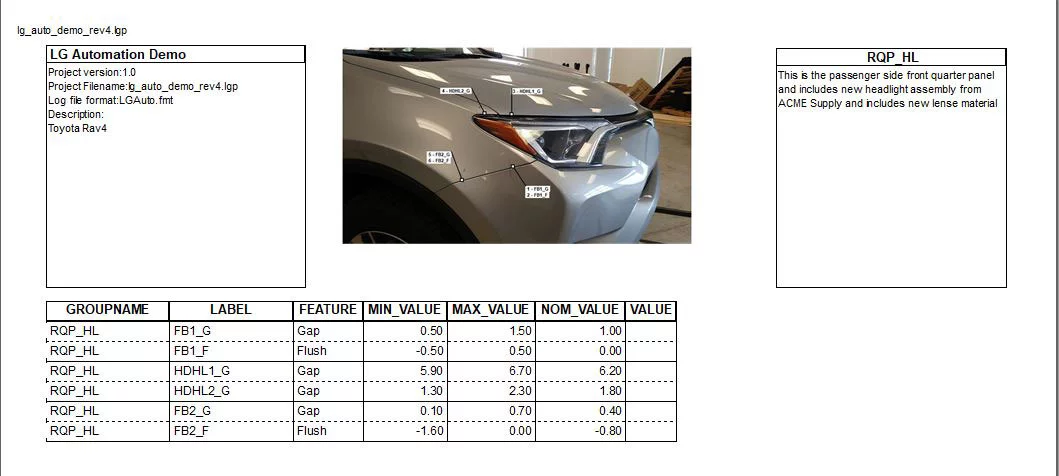
Routines can be documented with a printable roadmap showing each measurement point on the vehicle image and user-selectable information specific to the points in a table. Measurement data from the running of a routine can be imported into the roadmap and the values color coded as in-spec or out-of-spec.
DATA FILES
Data files are formatted by the user and can vary by routine. The user has a choice of delimiters and the file can include information contained in the routine or found on the controller. Operator input fields and LaserGauge® generated information can also be included in the data file, such as date, time, shift, operator, VIN, feature label, description, etc.
LGWorks Specifications
| System Compatibility: | LG1102, LG1200, LG4101, LG7000 controllers and all DSP Sensors |
| Communication to LaserGauge® from Computer: | LG1102-null modem serial cable; LG1200-USB null modem cable and Ethernet; LG4101-null modem cable and wireless RF; LGX000 and DSP sensors-USB cable or wireless ZigBee |
| Operating System: | Windows™ |
| Disk Space: | 64MB |
| Memory: | 512 MB RAM |

LASERGAUGE® IS PART OF THE LMI CORPORATION FAMILY OF PRODUCTS.
LaserGauge® products and solutions are trusted and used by leading manufacturing companies around the world.
